
March 2026: what’s happening to hotel bookings right now and what to do
March 2026: what’s happening to hotel bookings right now and what to do.
What is the booking window in hotels and why it matters
The booking window indicates how many days pass between the moment a reservation is made and the stay date.
For example:
A guest books on May 1 for a stay on June 1: the booking window is 30 days.
A guest books on May 28 for a stay on June 1: the booking window is 4 days.
Analyzing this data and comparing it with your historical data is the most reliable way to understand how far in advance your guests typically book—and whether that behavior is changing.
Very often, hoteliers compare only occupancy levels. For future dates, however, this approach can be misleading. If the booking window is getting shorter, it’s normal for on-the-books occupancy (the rooms already booked for a future date) to look lower than in previous years.
What’s the risk of looking only at occupancy? Falling into the “empty rooms panic” and lowering prices too early, even though demand has not yet activated.
A practical example
Imagine analyzing the month of August for your property. Two years ago the situation might have looked like this:
- 60% of rooms booked 60 days in advance
- 40% of rooms booked 30 days in advance
Today you might be facing a very different scenario:
- 30% of rooms booked 60 days in advance
- 70% of rooms booked 30 days in advance
with strong growth in bookings during the last 10–15 days.
In this second scenario, if you looked at August occupancy at the beginning of June, you might see far fewer rooms sold compared to two years ago and think you’re behind schedule or that demand is weaker.
Analyzing the booking window helps you avoid this mistake. It allows you to understand the real pace of demand and decide more precisely when to adjust your rates.
In particular, if bookings are arriving closer to the stay date, you should keep pricing flexible, avoid lowering rates too early, and leave room to increase prices when demand activates in the final days.
If you want to explore this topic further, read our article on how to turn last-minute bookings from an “emergency” into a strategy.
How to analyze the booking window manually
The data needed to analyze the booking window is available in most property management systems (PMS) and channel managers. The main challenge is that this data is rarely ready to be analyzed immediately.
To really understand how your booking window is changing, you would need to:
- export reservation reports from your PMS
- match booking dates with stay dates
- organize everything in spreadsheets to compare the data
- update the data every day
This is a long manual process and carries a high risk of mistakes or overlooked details. That’s why the best way to analyze the booking window is to use a tool that gives you access to processed and continuously updated data, such as the dynamic pricing and revenue management software Smartpricing.
How to analyze the booking window with Smartpricing
Smartpricing allows you to analyze the booking window through the Pickup Report section.
The Pickup Report shows how many nights are booked and canceled day by day for a specific stay date. This means you can clearly see:
- when bookings start coming in
- how quickly occupancy grows
- whether most reservations are concentrated close to the stay date
Practical example
Imagine you want to analyze September 2026.
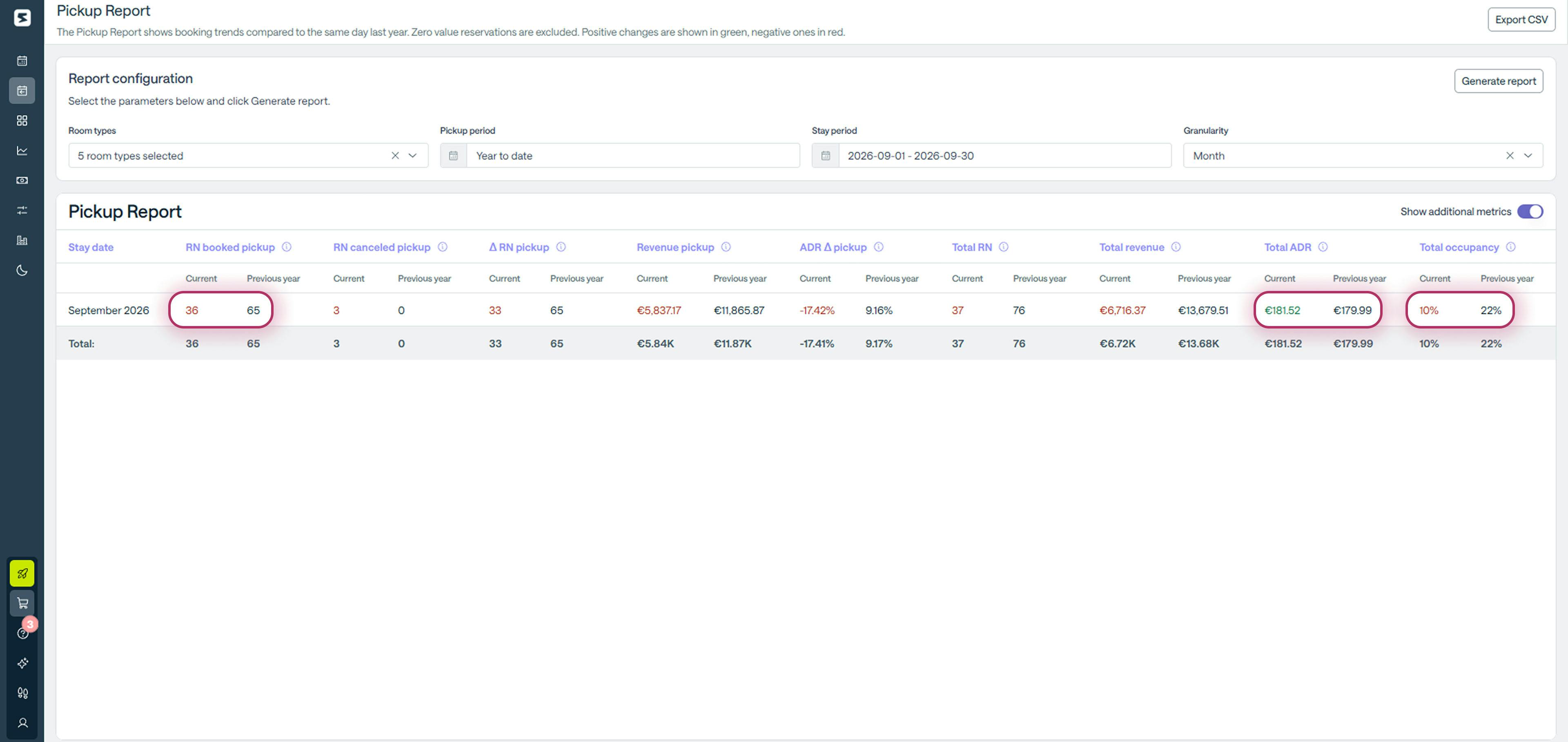
By looking at the Pickup Report, you would see that:
- booked nights are decreasing (65 in 2025, 36 this year)
- on-the-books occupancy has dropped by about 50% (from 22% to 10%)
- ADR (average daily rate) is slightly higher than last year (from €179.99 to €181.82)
In a situation like this, you might think:
“Maybe it’s better to lower prices now rather than reach the last minute with weak occupancy and have to make drastic price cuts.”
But what if the problem isn’t the price, but demand shifting closer to the stay date?
To verify this, you can extend the Pickup analysis to the entire year 2026, starting from January 1.
Here’s what you would see in just a few seconds:
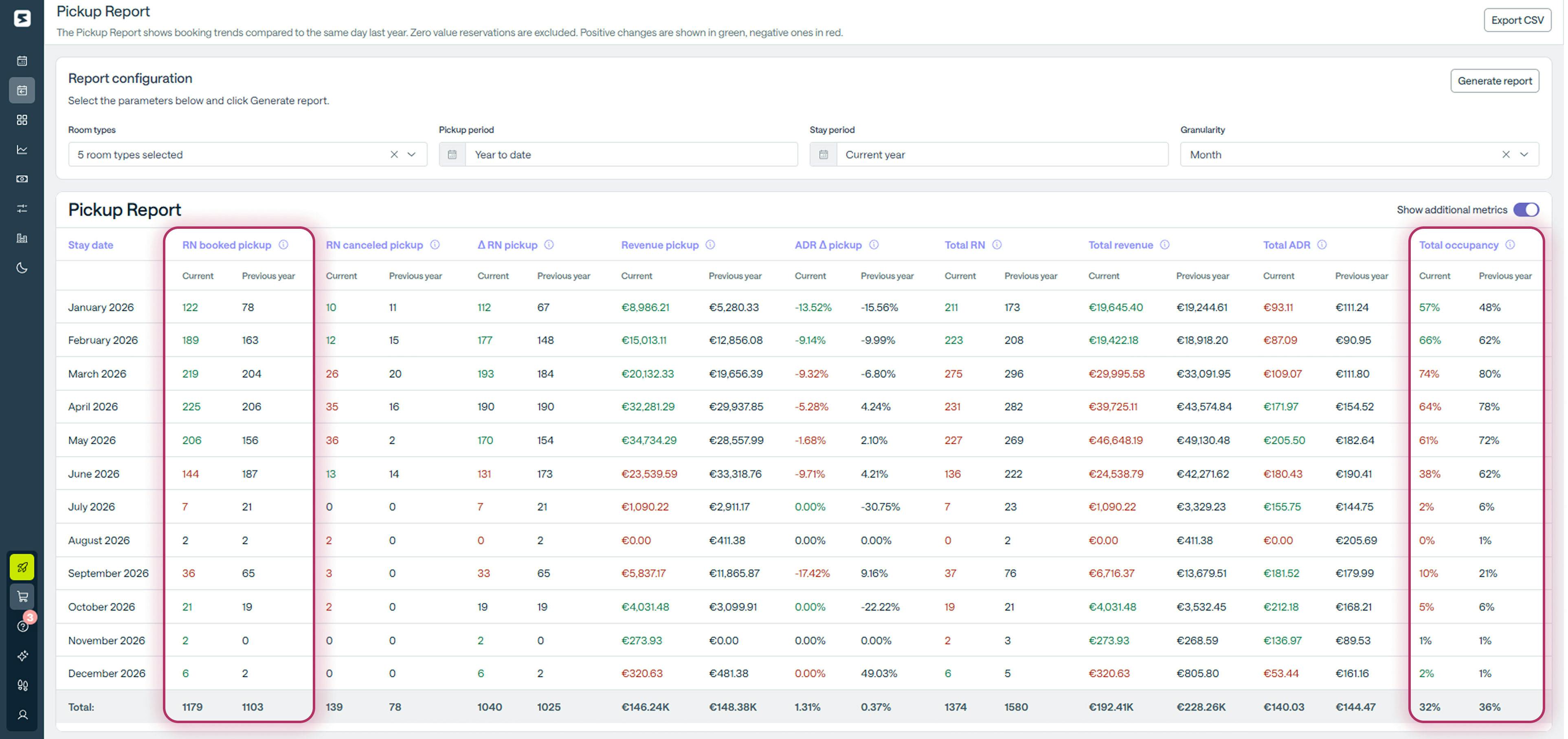
Looking at the report, we can see that the property’s overall occupancy is slightly lower (32% compared to 36% at the same time last year).
But what do the reservations tell us?
- most bookings are concentrated in the closest months (January, February, March, April, and May)
- the only months where 2026 occupancy exceeds 2025 are January and February, which are already consolidated months
In this case, the Pickup Report reveals something important: this year’s performance is not necessarily worse overall (the consolidated months are growing), but the rhythm of bookings is changing.
At this point, you have an additional piece of information to decide what to do with September rates. Lowering prices now would not necessarily bring more bookings—and you might lose revenue that would be difficult to recover later.
The better strategy is to keep analyzing the data daily and wait until you have a clearer picture before deciding whether it truly makes sense to lower your rates.
The final check: analyze market occupancy
At this point, you might still have one doubt: what if the shorter booking window only affects your property? In that case, lowering your prices might still seem like a reasonable decision.
To verify this, Smartpricing also allows you to access the Market Analysis page, where you can monitor competitors and compare your occupancy with the market day by day.
Want to check how the market is performing? Do it now, free!
Returning to the September 2026 example, the screenshot below shows that your occupancy is actually largely in line with the market.
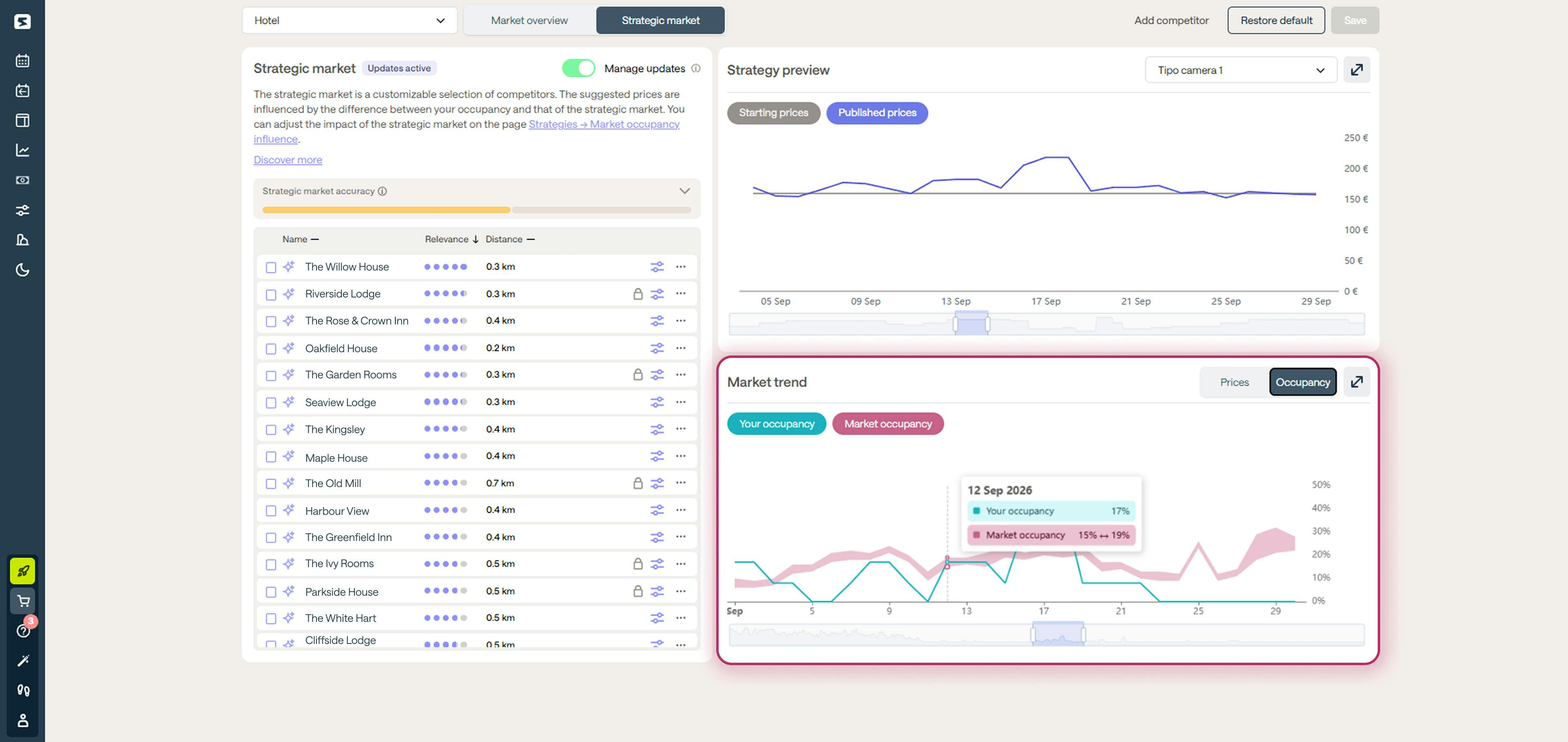
In just a few minutes, Smartpricing has given you a clear answer to your initial question: the issue does not affect only your property. Instead, you are looking at a booking trend that is also impacting your competitors.
The difference is that you can analyze it day by day and protect your pricing decisions from impulsive reactions, while many of your competitors cannot.
The best part? While you keep an eye on booking trends, the Smartpricing algorithm automatically optimizes your prices based on occupancy, market trends, and distance from the stay date.
This way, you can be confident you are selling at the most profitable price, even when conditions change quickly.
Want to see how it works?
Request a personalized demo
Talk to a Smartness expert and discover how to automate your pricing strategy and increase your property’s revenue by an average of 30 percent. Free, no obligation.
Spring hotel pricing and bookings: are you ahead of last year?
Discover which data to review and analyze your future performance in 5 steps before spring and summer.
How events affect hotel rates: what Radiohead and the Winter Olympics can teach you
Learn how to properly estimate event impact and sell your rooms at the most profitable rate.